
Heart Moments
CreatunityMusic & Audio
4.7288.00 Reviews
- Version
- 3.5
- Installs
- 500.00K
- Age Rating
- Everyone
Screenshots
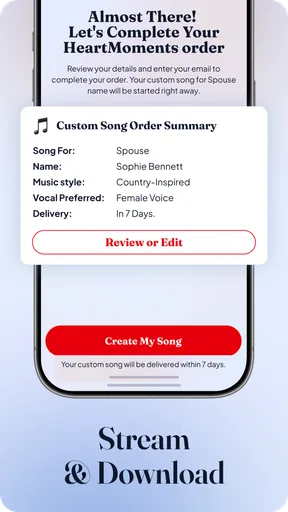
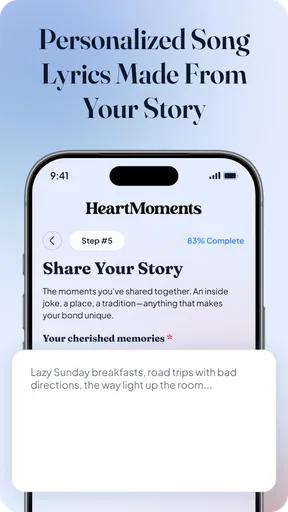
Our Review of Heart Moments
 Analysis by Appyee
Some memories stay vivid because of the sound attached to them: a song from a first trip, a quiet family video, or a short clip that feels more personal than its camera quality suggests. Heart Moments, a free music and audio app from Creatunity, is built around that emotional connection. Its central idea is simple: give a favorite memory its own melody instead of leaving it with ordinary background sound or silence.
After spending time with it, I see the app less as a general music player and more as a creative tool for turning personal moments into something that feels deliberately made. That distinction matters. If you want a large catalog for listening, there are better-known alternatives. If you want to add a musical identity to a meaningful memory, this app has a much more focused purpose.
The app has a 4.7 average from around 3.6 thousand ratings, and it has passed 500 thousand installs. Those figures suggest that the idea connects with a sizeable audience, but they do not tell you whether it fits your habits. In my experience, the real question is not whether Heart Moments is useful in general; it is whether you regularly create, save, or share personal memories that would benefit from a more intentional soundtrack.
Turning a memory into its own musical moment
I find the idea most useful when I treat the melody as a choice that depends on the moment, not as an automatic finishing touch. In the next section, I look at how that focused approach differs from opening a music player or a full video editor, and where its simplicity becomes a constraint.
The capability that defines the experience
The strongest part of Heart Moments is its focus on assigning a unique melody to a memory. Rather than treating music as something you play separately from your photos or videos, the app encourages you to think of sound as part of the memory itself. That changes how I approach a clip. I am not simply choosing a pleasant track; I am trying to find a musical feeling that matches what the moment means.
This is especially effective for memories that are visually simple but emotionally important. A short recording of a birthday gathering, a walk with someone close, or a quiet family scene may not need dramatic editing. A suitable melody can provide the emotional shape that the raw recording lacks. The result feels more considered without requiring the kind of editing knowledge associated with full video-production apps.
The important strength is emotional focus, not musical complexity. Heart Moments works best when the goal is to make a memory feel personal. It is not aimed at musicians who need detailed control over arrangement, recording, mixing, or notation. Its value comes from helping ordinary users make a meaningful moment feel finished.
Why this feels different from ordinary music apps
Most music apps begin with listening. You search for an artist, album, playlist, or mood, then press play. Heart Moments begins with the memory. That reversal makes it more intimate, but also narrower. I would not open it when I simply want to discover new songs during a commute. I would open it when I already have a moment in mind and want sound to reinforce it.
Compared with a standard video editor, the experience is also more approachable in concept. Traditional editors often present timelines, layers, trimming tools, transitions, and export settings. Those controls are useful when precision matters, but they can distract from the emotional reason for making the clip. Heart Moments appears designed around the feeling first, which makes it appealing to people who want a result without learning a full editing workflow.
That simplicity comes with a trade-off. A focused emotional tool cannot replace the flexibility of a complete editor. If you need exact beat matching, several audio layers, detailed volume automation, or frame-by-frame timing, a dedicated editing app will give you more control. Heart Moments makes more sense when the music should support the memory rather than become the main technical project.
How I would use it in practice
I would begin with one memory rather than importing a large collection at once. Choosing a single clip forces me to decide what I want the finished result to communicate: warmth, nostalgia, celebration, calm, or something more reflective. That small decision is useful because the same image can feel completely different when paired with different musical moods.
For a family video, I would avoid selecting music only because it sounds impressive on its own. A melody that dominates the voices or makes a quiet scene feel overly dramatic can weaken the memory. I would listen for something that leaves room for the original atmosphere. This is one of the app’s less obvious lessons: the best result may be the melody that supports the moment quietly, not the one that attracts attention immediately.
I would also keep the first version short and focused. A memory does not necessarily become more moving when every available second is filled with music. A compact clip with a clear beginning and ending can feel more intentional than a longer sequence that repeats the same emotional idea. This is not a technical rule imposed by the app; it is a practical creative choice that helps the melody feel connected to the memory.
An everyday scenario where it makes sense
Imagine returning from a weekend away with several phone videos: a view from a train window, a meal with friends, and a few unplanned moments from the walk home. None of the clips needs a polished travel montage, but together they represent a particular mood. I would choose the most meaningful clip, use Heart Moments to give it a melody, and treat that result as the emotional centerpiece rather than trying to edit everything into a long recap.
That approach avoids a common problem with memory projects: adding too many effects because the raw material feels ordinary. The app’s focused purpose encourages a simpler decision. Pick the moment that matters, give it an appropriate musical identity, and let the emotional connection do most of the work.
The same workflow could suit a small personal gift. A short video for a birthday, anniversary, graduation, or remembrance can feel more thoughtful when its music is chosen around the person and the moment. I would still preview the result carefully before sharing it, especially if the original clip contains conversation. Music that sounds gentle through headphones may be too loud or distracting on a phone speaker.
Practical questions about getting started
Heart Moments is available at no upfront cost, and its content rating is Everyone, which makes it approachable for a broad audience. It runs on Android 8.0 or later, so compatibility is worth checking before installing it on an older device. The current version is 3.5, and the app was released on January 28, 2026.
The free entry point is helpful for trying the central idea without committing immediately. However, in-app purchases range from $9.99 to $79.99 per item. That is a meaningful consideration, particularly if you only expect to create one occasional memory. I would test the free experience first and decide whether the workflow genuinely improves your projects before paying for anything.
Because the app is centered on personal memories, I would also prepare the source material before opening it. Pick a clip with a clear emotional purpose, remove duplicates from your camera roll if necessary, and decide whether the original sound matters. If the voices or ambient noise are essential, the melody should remain secondary. If the clip is visually strong but silent, the app has a clearer opportunity to add value.
The trade-off between ease and control
The app’s narrow purpose is both its advantage and its limitation. I like that the concept does not ask me to become an editor before I can create something personal. The reduced complexity makes it easier to concentrate on the relationship between image and melody. For casual users, that can be more valuable than a long list of professional controls.
On the other hand, people with very specific musical expectations may find the experience restrictive. If you already know the exact song, tempo, structure, or transition you want, an ordinary editor or a more advanced audio tool is likely to be a better match. Heart Moments is most convincing when you want guidance toward an emotional result, not when you have a precise production plan that the app must follow.
There is another subtle trade-off: a unique melody can make a memory feel more personal, but it can also make the result feel less familiar than using a recognizable song. Familiar music carries its own associations and can instantly establish a mood. A dedicated melody offers a cleaner connection to the individual memory, yet it may require more attention from the viewer before its emotional effect becomes clear.
I would therefore avoid treating the app as a replacement for every soundtrack choice. Sometimes the right decision is a well-known song, natural room sound, or complete silence. Heart Moments earns its place when the memory deserves a musical layer but does not already have one that feels right.
Three ways to get better results
- Choose the memory before choosing the mood. Decide what the clip means to you first. This prevents the melody from dictating an emotion that the images do not support.
- Protect important natural audio. If laughter, a greeting, or a small environmental detail carries the memory, keep the musical layer restrained instead of covering it.
- Use one emotional idea per clip. A melody works more clearly when the video is about one feeling or event rather than several unrelated moments stitched together.
A fourth useful habit is to preview the result in the way it will actually be watched. If you plan to send the memory to someone, test it on the phone speaker as well as headphones. Personal videos are often viewed casually, and an arrangement that sounds balanced in headphones may feel too strong or too faint in a different setting. This kind of check is easy to skip, but it can make the finished memory feel much more polished.
Who gains the most from it
Heart Moments is a strong fit for people who regularly save personal photos and videos but rarely edit them. It can also suit parents, grandparents, couples, travelers, and anyone who enjoys making small digital keepsakes rather than public-facing content. The app’s emotional focus is particularly useful when the goal is to share something thoughtful with one person instead of producing a polished social-media post for a wide audience.
It may also help users who feel overwhelmed by conventional editing software. The usual alternative is to open a video editor and face a large workspace full of controls. That is powerful, but it can turn a simple memory into a project. Heart Moments is better for the person who wants a gentle creative prompt: start with the memory, consider its feeling, and build the music around it.
I would be more cautious about recommending it to musicians, experienced creators, or anyone producing commercial content. Those users may need reliable control over sound design, licensing choices, timing, exports, or multiple audio elements. A specialized editor gives them room to work, while this app’s appeal depends on staying focused and approachable.
I would also skip it if you primarily want a conventional streaming service. The store places it in Music & Audio, but its identity is not that of a broad listening platform. It is better understood as a memory-oriented creative app. Installing it expecting playlists, artist discovery, or a replacement for a daily music player would lead to the wrong impression.
How it compares with the usual alternatives
Against a standard music player, Heart Moments is more personal but much less general-purpose. A music player wins for discovery, repeat listening, offline routines, and broad catalog browsing. Heart Moments wins when the music needs to belong to a particular memory rather than simply accompany a day.
Against a full video editor, it is easier to approach but less suitable for precision work. A traditional editor is the better choice for a travel montage with several sections, carefully timed cuts, captions, visual effects, and detailed audio adjustments. Heart Moments makes more sense for a single emotional clip where the melody is the main creative addition.
Against using a familiar song from your own library, the app offers a more individualized direction. A known song can immediately communicate a shared reference, but it may also bring associations that compete with the images. A unique melody keeps the focus on the memory itself. The better option depends on whether you want recognition or personal definition.
My final view after using the concept seriously
What I appreciate most about Heart Moments is that it treats music as part of remembering, not merely as decoration. The app encourages a useful question: what should this moment feel like when someone watches it again? That question is more valuable than adding effects for their own sake, and it gives the experience a clear identity within the crowded Music & Audio category.
Its limitations are equally clear. The price range of its optional purchases means I would not recommend paying before testing the free experience. The focused design may also feel too narrow for users who want advanced editing or a full music library. Those are not minor details; they determine whether the app will become part of your routine or remain an interesting one-time experiment.
For me, the best reason to try it is not the promise of making every memory more dramatic. It is the possibility of making one important memory feel more deliberately yours. Start with a short clip, preserve the natural sounds that matter, and judge the result by whether the melody supports the feeling rather than overpowering it. If that is the kind of small creative task you enjoy, Heart Moments is worth exploring.
Creatunity has built an app with a clear emotional purpose, and that clarity is its biggest strength. It will not replace a music player or a serious editing suite, but it does not need to. For people who want to give a personal memory its own musical character without turning the process into a technical project, Heart Moments offers a focused and approachable way to begin.
Verdict
Strengths of Heart Moments
- Simple interface makes sharing heartfelt moments quick and easy.
- Encourages meaningful conversations and emotional connection.
- Personalized prompts can help users express feelings more openly.
- Suitable for couples, friends, and family members.
- Lightweight experience with minimal setup required.
Limitations of Heart Moments
- Some features may feel repetitive after frequent use.
- Limited value if your contacts do not use the app.
- Privacy details should be checked before sharing personal emotions.
- Customization options may be fairly basic.
- Notifications could become distracting for frequent users.
Similar Picks in This Category
View All
YouTube Music
Google LLC4.4

Samsung Music
Samsung Electronics Co., Ltd.3.8

Spotify: Music and Podcasts
Spotify AB4.3

JioSaavn - Music & Podcasts
Saavn Media Limited4.3

Lark Player:Music Player & MP3
Lark Player Studio - Music, MP3 & Video Player4.6

StarMaker: Sing Karaoke Songs
SKYWORK AI PTE. LTD.4.3
Frequently Asked Questions
What is Heart Moments, and what can I use it for?
Heart Moments is designed to help users capture, organize, and revisit meaningful memories through photos, notes, messages, or personal reflections. After exploring the app, its main appeal is its focus on emotional moments rather than simple file storage. It can be useful for keeping relationship memories, family milestones, celebrations, or private thoughts together in one convenient place.
Is Heart Moments free to download and use?
Heart Moments may be available as a free download, but some features can depend on the version offered through the Google Play Store or Apple App Store. Before installing, check the store listing for premium tools, subscriptions, advertisements, or optional purchases. Reviewing the pricing details is especially important if you want unlimited storage, advanced customization, backup options, or access to every feature.
Does Heart Moments require an account or internet connection?
The exact requirements can vary according to the platform and the features you use. Basic content creation may work without a constant connection, while synchronization, cloud backup, sharing, or account-based access may require internet service. During setup, check which permissions and sign-in details are requested, and avoid granting access that is not necessary for the way you intend to use the app.
Is my personal information and memory content safe in Heart Moments?
Because Heart Moments can involve private photos, messages, and emotionally sensitive memories, privacy should be considered before uploading or sharing anything. Read the app’s privacy policy to understand how data is collected, stored, synchronized, and potentially shared with service providers. It is also wise to use a strong device lock, review sharing settings, and keep independent backups of important content.
Can I share Heart Moments content with other people?
Sharing capabilities depend on the tools included in the current version of Heart Moments. You may be able to send selected photos, notes, or memories through standard mobile sharing options, although some content could remain private by default. Before sharing, verify exactly what is included, whether links can be accessed by others, and whether recipients need the app or an account to view the material.
